
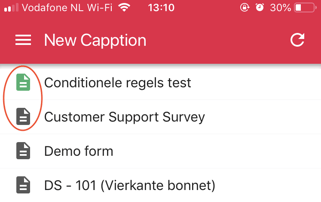
What is the difference between the green and grey icons that are shown in the app?
A template with a green icon is fully available offline including help images and intro attachments, as opposed to a template with a grey icon.
This does not mean that templates with grey icons aren’t available offline; they just don’t have additional attachments included when you’re filling out templates offline.
When you have an internet connection, there’s no difference between these two icons!
Was this article helpful?
YesNo
Related articles
- Logging into the App
- Moving templates to a different team
- How to download the Capptions app?
- Cloning templates
- Group assigned templates